
Last updated on
Nov 6, 2026

TN Rooks CPA Client Information Form 2010-2026 free printable template
pdfFiller is not affiliated with any government organization

Fill out
Complete the form online in a simple drag-and-drop editor.

eSign
Add your legally binding signature or send the form for signing.

Share
Share the form via a link, letting anyone fill it out from any device.

Export
Download, print, email, or move the form to your cloud storage.
Why pdfFiller is the best tool for your documents and forms


End-to-end document management
From editing and signing to collaboration and tracking, pdfFiller has everything you need to get your documents done quickly and efficiently.
Accessible from anywhere
pdfFiller is fully cloud-based. This means you can edit, sign, and share documents from anywhere using your computer, smartphone, or tablet.
Secure and compliant
pdfFiller lets you securely manage documents following global laws like ESIGN, CCPA, and GDPR. It's also HIPAA and SOC 2 compliant.
What is TN Rooks CPA Client Information Form
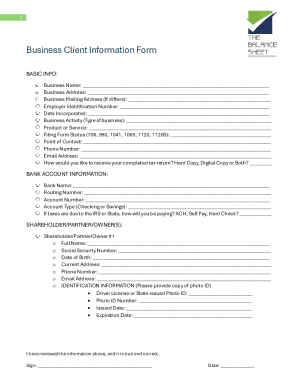
The Client Information Form is a business document used by Rooks CPA, PLLC and Rooks Wealth Management, PLLC to collect essential personal and business details from clients for tax and financial services.
pdfFiller scores top ratings on review platforms




Easily fill in forms and save as pdf or jpeg. Love
PDFfiller is easy to use and works well.
seems easy and so far this has worked for me.
It makes it very easy to complete forms and questionnaires. I love it. Also easy to operate for computer challenged persons.
I've had some problems with the application but overall it meets my business needs.
I signed up originally to utilise this service. Whilst I did not wish to continue with the service (just wouldnt need it again) I did struggle to cancel the service. I sent an email outlining my issue and got the quickest response back and my account fixed and funds returned. Great service if you do require all the time. Easy to use. Highly recommend.
Who needs TN Rooks CPA Client Information Form?
Explore how professionals across industries use pdfFiller.

TN Rooks CPA Client Information Form is needed by:
-
Individuals seeking tax preparation services
-
Small business owners gathering financial documentation
-
Clients establishing or updating wealth management records
-
New clients requiring financial planning
-
Tax professionals aiding client record-keeping
-
Individuals needing comprehensive financial assessments
Comprehensive Guide to TN Rooks CPA Client Information Form
What is the Client Information Form?
The Client Information Form is a crucial document utilized by Rooks CPA, PLLC and Rooks Wealth Management, PLLC to collect essential personal and business data from clients. This form plays a vital role in gathering details required for efficient service delivery, including tax and financial planning. By completing this tax client form, users provide necessary information, such as their name, Social Security Number (SSN), and date of birth, which are integral for establishing or updating client records.
Among the fields included are contact details, marital status, and any pertinent business information. This thorough collection of data ensures that the financial needs of clients are accurately understood and met.
Purpose and Benefits of Using the Client Information Form
The Client Information Form is essential for both individuals and businesses who require efficient handling of their financial matters. This form aids in creating or updating client records, ensuring that your data is accurate and up to date. By utilizing this financial client form, clients can facilitate their tax preparation process, enhance their financial planning efforts, and improve communication with their CPA, leading to better service.
The benefits of this form include speedier tax filings, personalized financial advice, and overall improved client-CPA relationships. Each completed form helps streamline the necessary procedures for managing financial documents.
Key Features of the Client Information Form
The Client Information Form boasts several key features designed for user convenience and security. Key aspects include:
-
Multiple fillable fields for thorough data entry
-
Checkbox options to simplify selections
-
Clear instructions for necessary information required
-
Security measures to protect sensitive data during collection
These essential features not only enhance usability but also ensure compliance with best practices in wealth management and client data handling.
Who Should Use the Client Information Form?
This form is tailored for a diverse audience, including both individual clients and business professionals seeking to organize their financial data. New clients will find it particularly valuable for establishing their records, while existing clients can utilize it to update their information effortlessly. The personal business information form is suitable for anyone needing comprehensive service from their CPA or financial advisor.
Understanding the different profiles of users can help in tailoring the form to meet specific needs, ensuring that all information is accurately captured.
How to Fill Out the Client Information Form Online
Filling out the Client Information Form is straightforward when using pdfFiller. Follow these steps to complete the form accurately:
-
Access the Client Information Form through pdfFiller.
-
Fill in the required fields with personal and business information.
-
Double-check all entries for accuracy and completeness.
-
Save your progress and proceed to submit as needed.
By adhering to these instructions, users can ensure their data is entered accurately, minimizing potential errors that may impact their financial services.
Common Mistakes to Avoid When Completing the Form
While filling out the Client Information Form, users should be mindful of common pitfalls that could affect the accuracy of their submissions. Common mistakes include:
-
Leaving essential fields blank
-
Submitting incorrect or outdated information
-
Failing to read and follow instructions carefully
Avoiding these errors is crucial for ensuring all sections are completed accurately, thereby streamlining the processing of your financial needs.
How to Save and Submit Your Client Information Form
After completing the Client Information Form, users have several options for saving and submitting their documents. Here’s how:
-
Download the completed form to your device.
-
Print a physical copy for records.
-
Submit the form electronically through pdfFiller for faster processing.
Each submission method has distinct advantages, such as immediate electronic records retention or the option for traditional paper submissions.
Why Choose pdfFiller for Your Client Information Form Needs?
pdfFiller is the ideal platform for filling out and managing your Client Information Form. Users benefit from:
-
Ease of use with a straightforward online interface
-
Robust editing tools for modifications
-
eSigning capabilities to streamline approvals
-
Security measures including 256-bit encryption
These features not only ensure user satisfaction but also compliance with privacy laws, making pdfFiller a trusted choice for handling confidential documents.
What Happens After You Submit the Client Information Form?
Once you have submitted your Client Information Form, several important steps follow. Expect to receive confirmation of your submission, along with details on processing times. It is crucial to check the status of your application and to be prepared for any potential follow-up interactions or additional documentation requests.
Understanding these subsequent steps helps clients stay informed and ensures a smooth continuation of the services provided by Rooks CPA and Rooks Wealth Management.
Enhance Your Client Experience with pdfFiller
For a simplified and secure form-filling experience, utilizing pdfFiller for your Client Information Form is highly beneficial. This platform offers exceptional ease of access and peace of mind when handling sensitive information. With pdfFiller, clients can streamline their interactions and enhance their overall experience, ensuring effective management of their financial documentation.
How to fill out the TN Rooks CPA Client Information Form
-
1.To access the Client Information Form on pdfFiller, visit the website and log in to your account. Use the search bar to find 'Client Information Form' or navigate to the business forms section.
-
2.Once the form is open, you will see various fields requiring your personal and business information. Use the fillable fields to input details such as your name, SSN, date of birth, and contact information.
-
3.Before starting, gather necessary documents and information including your Social Security Number, date of birth, address, phone numbers, email addresses, marital status, and any relevant business and financial data.
-
4.As you complete the form, pay attention to each section. Use the checkboxes to indicate your marital status or other yes/no questions. Ensure all fields are filled accurately to avoid delays.
-
5.After filling out the form, review your entries for accuracy. Double-check critical information like names and SSN to minimize errors.
-
6.Once you’re satisfied with your input, save the form on pdfFiller. You can download it in your preferred file format or submit it electronically through the platform as instructed.

Who should fill out the Client Information Form?
The Client Information Form should be filled out by individuals and small business owners seeking tax preparation or financial services from Rooks CPA, PLLC and Rooks Wealth Management, PLLC.
What information is required to complete this form?
You will need personal details such as your name, SSN, date of birth, address, contact information, marital status, and business and financial data to complete the Client Information Form.
Is there a deadline for submitting the Client Information Form?
Yes, it is best to submit the Client Information Form as soon as possible to ensure timely processing of your tax and financial services. Check with your tax professional for specific deadlines.
How can I submit the completed Client Information Form?
After filling out the form on pdfFiller, you can either download it for personal records or submit it electronically through the platform. Follow the instructions provided to ensure proper submission.
What should I do if I make a mistake on the form?
If you make a mistake on the Client Information Form, simply return to the relevant field within pdfFiller and correct the entry before finalizing and saving your changes.
Do I need to provide supporting documents with the form?
While not explicitly mentioned, it is advisable to have supporting documents, such as identification and financial statements, ready for reference when completing the Client Information Form.
How long does it take to process the Client Information Form?
Processing times may vary, but typically, once submitted, the completion and acknowledgment may take several business days. Check with the firm for more specific timelines.
Related Content
Related Forms




Related Catalogs
Get the latest insights from our blog


If you believe that this page should be taken down, please follow our DMCA take down process
here
.
This form may include fields for payment information. Data entered in these fields is not covered by PCI DSS compliance.